Plan
Know where to build next.
Serviceability and demand scored on real geodata, before you commit capital to a build.
AI for all non-physical fiber network work
The agentic operating system for fiber networks.
One intelligence running your network and your business.
Replace fragmented OSS/BSS stacks with autonomous agents that handle route design, zero-touch provisioning, fault isolation, and subscriber billing without manual intervention.
Powered by Lux Prisma-1, our 70B-parameter model fine-tuned for fiber network engineering.
Start now →Frontier Models
The best AI for each job, chosen for you: careful reasoning for design, quick answers in the field. As AI improves, Lux gets better without you changing anything.
Agentic Harness
Agents that work reliably. Every result is checked twice before anyone sees it, and an agent only does the jobs you have allowed it to do.
Data & Integrations
Your systems, connected. Network records, devices, payments, ERP and CRM come into one secured place, so nobody types the same thing twice.
Context & Knowledge
Your business as code. Your standards, prices and rules, written down once, so every agent works the way your best people do.
Fiber Capabilities
Everything fiber work needs: design, splicing, permits, testing, activation, support and billing, done by proven engines that give the same answer every time.
Products & Interfaces
One map for the whole company: a workspace for every role, an app for every crew and a portal for your customers.
Security & Governance
Secured by design. Roles, approvals, single sign-on and a full record of every action. An agent never files, pays, digs or promises anything on its own.
The network lifecycle
Agents and humans build great networks together.
01 · Expansion and Analysis agents
AI that runs powerful spatial analysis on large datasets for complex decisions. It runs where your data already lives: Snowflake, BigQuery, Postgres and PostGIS on AWS, Azure or Google Cloud, and Esri ArcGIS.
SentA proposal to put Bayside on the plan, approved by a person; the survey work order, drafted.
02 · Survey agent
The survey goes to the crew's phones in walkable work orders; 286 poles come back photographed and checked.
SentSurvey work orders to the survey crew.
03 · Design agent
874 buildings and 912 homes: placed, routed, checked against your rules and priced at $703,863.
Sent679 work orders into the build plan; the design to a person for review.
04 · Permitting agent
One right-of-way package per street and crossing, from the approved design. A person files.
Sent25 permit packages to the permitting officer; digs on unpermitted streets held.
05 · Permitting agent, make-ready
286 poles checked with your cable on them: 12 need make-ready, 2 cannot be judged.
SentOne application per pole owner, waiting for your approval.
06 · Warehouse agent
The bill of materials checked against three yards; stock reserved, orders drafted, a pick list per crew.
Sent4 purchase orders for approval; 7 pick lists to the crews.
07 · Splice and Riser agents
197 sheets, one per office, cabinet and closure, every port traced to its home.
Sent197 sheets to the two splicing crews.
08 · Project Manager and Ops agents, the crew's phone
679 work orders on the crews' phones; each job guided by voice, its photo checked, its as-built accepted.
SentThe day's work orders to each crew; the as-built to a person.
09 · NOC and Ops agents
A manager runs crews and outages from one view.
SentA repair work order to the nearest qualified splicer; 36 outage notices, approved by a person.
10 · The crew, the network, billing
The light reading passes, the service turns on, billing starts, the customer gets a welcome.
SentThe activation to the network; the welcome email to a person to send.
All stages
Every step's output feeds the next, and every decision waits for a person.
SentEach step's work to the next; each decision to a person.
Recorded from the live demos, sped up.
Automations
Command Center
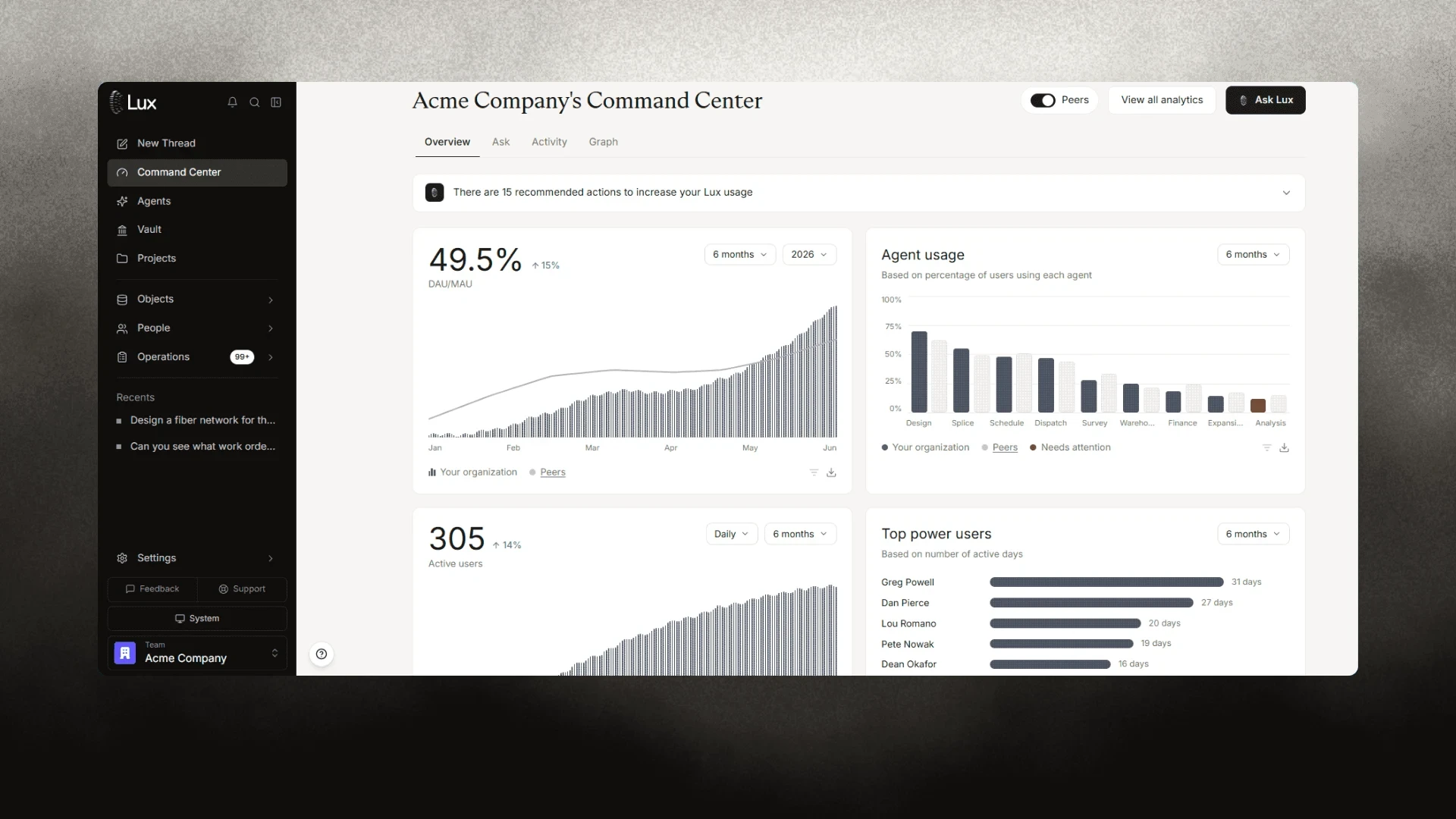
Adopt AI faster across your organization, and track it with live analytics: who uses it in every team, what every agent did, what it cost and what your people approved.
Start nowAfter the design
Plan
Serviceability and demand scored on real geodata, before you commit capital to a build.
Build
Work orders and splice instructions on your crews' phones, with every as-built photo checked against the design.
Operate
Every route, crew and alarm in one view. Ask how the build is going and get the answer from your data.
Permits

Every municipality wants its own forms, so permits wait on paperwork. Lux's permit agent drafts each package from your design: application, route sheets, cross-sections, schedule, traffic control and pole attachments. We set it up for your municipalities' formats and your standards, and when either changes, we update it and the agent redrafts. Your team reviews and files.
Start nowQuality control

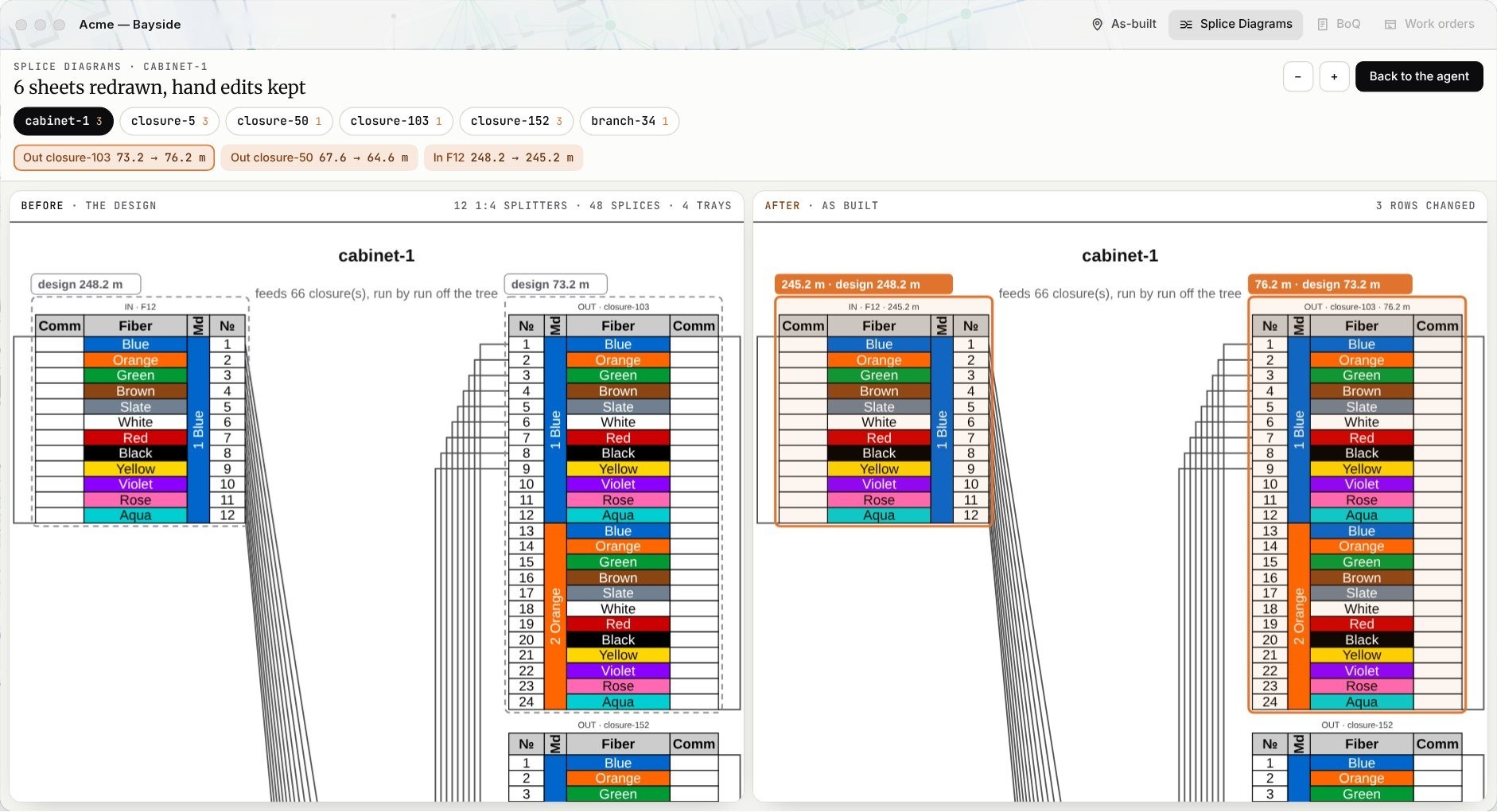
Crews photograph each job on site. AI vision checks every photo against your own standards, shows what it saw and gives a pass or fail for each rule, so a retake happens before the truck leaves. Field changes come back as as-builts that update the design, the splice sheets and the bill of quantities.
Start nowNothing to migrate. Lux reads your files as they are and hands the work back in the formats your teams already use.
Your records

Finished work
Lux connects to your GIS, your files, your ERP and your data, and reads them as they are. Nothing has to be migrated first.
No match. Send us an export instead.
Built for
Security
Lux is built with the controls enterprise security teams ask for: SSO, role-based access, encryption in transit and at rest, a tamper-evident audit trail, and agents that never file, pay, dig or promise alone.
More about securityIn progressCertification audits underway. Lux is not certified yet.
Questions
AI for all non-physical fiber and broadband work, across the entire network lifecycle. Lux agents design your network and produce everything that follows from it: splice and riser diagrams, bills of quantities, make-ready and permit packages, work orders and answers about your network. Your crews do the physical work. Lux does the desk work.
Lux is Latin for light, and light is what a fiber network carries. Every splice, closure and drop you build exists to get it to a home. Lux is built to get it there faster, with fewer mistakes, from the first design to the last connection.
Yes, because nothing reaches the field unchecked. Routing and calculations run on deterministic engines, every design is checked against your engineering rules and the optical budget of each path, and your engineers approve every output. Each decision traces back to the rule or input behind it.
Yes. Keep your GIS and connect Lux to it. Lux connects to ArcGIS and standard web map services, reads DWG, DXF, shapefile, GeoJSON, GeoPackage, KML and spreadsheets, and links to SAP, Salesforce, Snowflake, BigQuery, PostgreSQL, Google Workspace, Slack and Jira. Nothing has to be migrated first.
Only as far as you allow. An agent never files, pays, digs or promises alone. Whoever proposes a change is not whoever approves it, every action is role-gated and off until an administrator turns it on, and every governed action is written to a tamper-evident audit trail.
Your data is encrypted in transit and at rest, isolated per workspace, and reached through role-based access and SSO with your identity provider. It is never used to train models. Export everything at any time and delete it on your schedule.
No. Your engineers stop drafting and start reviewing. Lux drafts the work and your team approves it, so the same team can take on more areas.
Standard GIS and CAD formats in and out, including DWG, DXF, shapefile, GeoJSON, GeoPackage, KML/KMZ, CSV and Excel, with documents in PDF and Excel. Deliverables come in your language, with your fiber color code (TIA-598-C, IEC 60304, DIN VDE 0888 or your own) and your templates.
Start now in the app, or contact sales and send us one serving area: we return it designed and priced in 48 hours. Lux imports your GIS layers, CAD files and spreadsheets and fills gaps from public geodata.
Accessibility
Saved on this device only.
Accessibility statement
Lux wants everyone to be able to use lux.tech, including people with disabilities. We work to meet Israeli Standard IS 5568, which is based on the Web Content Accessibility Guidelines (WCAG) at level AA, as required by the Equal Rights for Persons with Disabilities (Service Accessibility Adjustments) Regulations, 2013.
What we did: text and controls meet AA colour contrast; the site works with a keyboard, with a visible focus outline and a skip-to-content link; buttons, tabs and lists carry the right roles for screen readers; images carry text alternatives; animation stops on request. These options are always available from the Accessibility link: larger text, high contrast, stop motion and video, underlined links, a readable font and a strong focus outline. We test the site with axe-core, an open-source accessibility checker.
What is not fully accessible yet: the interactive product demos are visual simulations of the Lux app; some of their maps and diagrams cannot be fully described to a screen reader. The background videos have no speech. If any part of the site does not work for you, tell us and we will help and fix it.
Contact: write to us through lux.tech/contact and mark the message "Accessibility". We reply within two business days.
Last updated: 19 October 2026.
הצהרת נגישות
Lux פועלת כדי שכל אדם, כולל אנשים עם מוגבלות, יוכל להשתמש באתר lux.tech. אנו פועלים להתאים את האתר לתקן הישראלי ת"י 5568, המבוסס על הנחיות WCAG ברמה AA, בהתאם לתקנות שוויון זכויות לאנשים עם מוגבלות (התאמות נגישות לשירות), התשע"ג-2013.
מה ביצענו: ניגודיות צבעים ברמת AA, ניווט מלא במקלדת עם סימון מיקוד ברור וקישור דילוג לתוכן, תפקידים נכונים לכפתורים, לשוניות ורשימות עבור קוראי מסך, טקסט חלופי לתמונות, ועצירת אנימציה לפי בקשה. בקישור "Accessibility" זמינים תמיד: הגדלת טקסט, ניגודיות גבוהה, עצירת תנועה ווידאו, הדגשת קישורים, גופן קריא וסימון מיקוד בולט. האתר נבדק בכלי הבדיקה החופשי axe-core.
מה עדיין אינו נגיש במלואו: ההדגמות האינטראקטיביות הן הדמיה חזותית של אפליקציית Lux, וחלק מהמפות והתרשימים בהן אינם ניתנים לתיאור מלא לקורא מסך. בסרטוני הרקע אין דיבור. אם חלק כלשהו באתר אינו נגיש עבורך, ספר/י לנו ונסייע ונתקן.
פנייה: דרך lux.tech/contact, עם הכותרת "נגישות". נענה בתוך שני ימי עבודה.
עודכן לאחרונה: 19 באוקטובר 2026.